Third Party Integration by Unique Code
This document outlines the procedure for third-party platforms to securely generate an API Key, which is essential for making subsequent authorized requests to the Hyros platform.
Prerequisites
A unique integration code must be provided by Hyros before proceeding with the integration flow.
How it works
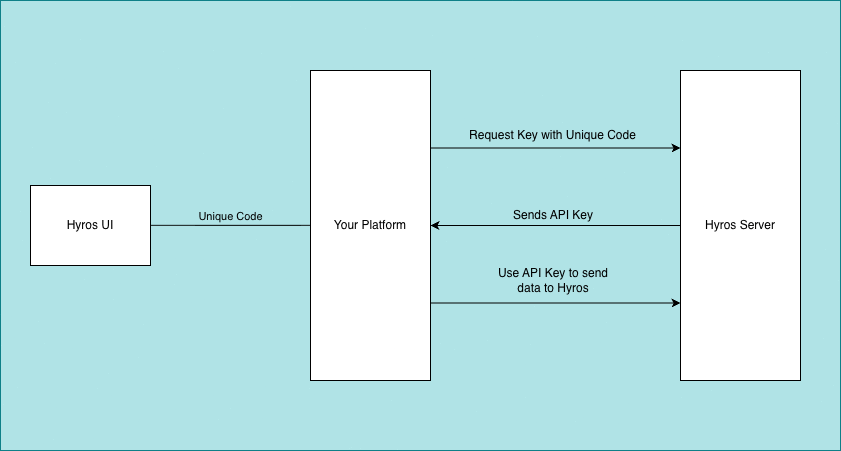
The end user clicks on connect button from the Hyros integration list, which will redirect to a integration page on your platform with a one time unique code in the URL, like https://yourdomain.com/integrations/hyros?code=1234567890
That unique code can be used one time to generate an fetch an API Key from Hyros.
That API Key needs to be stored at the integration level in your database as that will be used with all requests.
With the retrieved API Key, you can perform any request to Hyros to retrieve or send data, including:
- Retrieving the tracking script that needs to be embeded in funnel / website / checkout / thank you pages
- Create leads, calls, orders and subscriptions inside Hyros
- and much more
Our API docs can be found here
Diagram Flow
Here’s a flow diagram explaining the mechanism:
Request
Here’s the API endpoint you’ll be communicating with. This endpoint only receives POST method requests.
[POST] https://api.hyros.com/v1/api/v1.0/external-integration/api-keys
Payload
Your payload would look like the following.
{ “name”: “My API Key 001”, “code”: “YOUR_CODE” }
| Property | Format | Required | Description |
| name | string | YES | The name you want to assign to the API Key. |
| code | string | YES | A unique code provided by Hyros. Note: This code is only valid for 5 minutes after issuance |
Response
When you get a positive response, it will look like the following, it contains the newly generated API Key and relevant data.
{ “id”: 1, “name”: “My API Key 001”, “key”: “YOUR_API_KEY”, “creationDate”: 1762783729668, “lastUpdateDate”: 1762783729668, “status”: “ENABLED”, “email”: “username@hyros.com”, “roles”: [ “API_ROLE_1”, “API_ROLE_2”, “API_ROLE_3”, … ] }
| Property | Format | Description |
|---|---|---|
| id | integer | The unique identifier for the newly created API Key record. |
| name | string | The name assigned to the API Key. |
| key | string | The securely generated API Key. This key must be used in all subsequent authorized requests to the Hyros platform. |
| creationDate | integer (timestamp) | The timestamp (in milliseconds) when the API Key was created. |
| lastUpdateDate | integer (timestamp) | The timestamp (in milliseconds) when the API Key was last updated. |
| status | string | The current status of the API Key (e.g., “ENABLED”). |
| string | The email address associated with the Hyros account that provisioned the unique code. | |
| roles | array of strings | A list of roles granted to this specific API Key, determining what actions can be performed when using it. |
Note: The generated key (API Key) should be stored securely by the third-party platform and treated as a sensitive credential.
